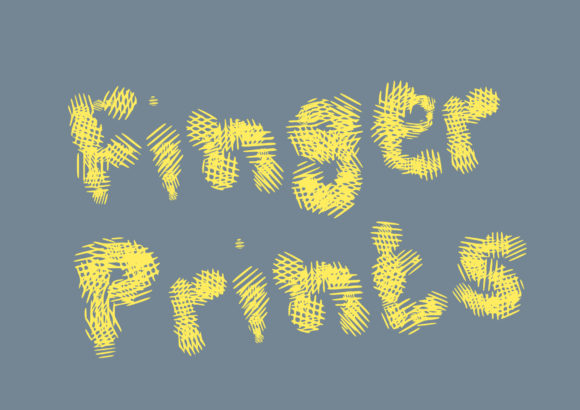
Finger Prints: A Playful Font for Creative Projects
Looking to add a touch of whimsy and uniqueness to your designs? Finger Prints is a hand-brushed display font that brings a sense of playfulness and personal flair to any project. With its organic, textured strokes, it’s perfect for everything from branding to scrapbooking. But like any creative tool, using Finger Prints effectively requires more than just downloading it—it demands thoughtful application.
What Is Finger Prints?
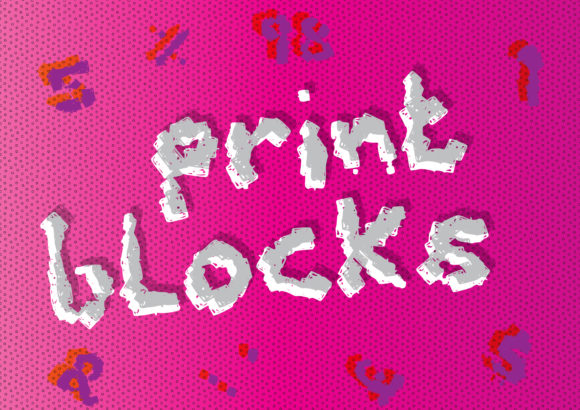
Finger Prints is a display font designed to mimic the look of handwriting, with a soft, brush-like texture that gives it a tactile feel. Its irregular lines and gentle curves make it stand out from standard sans-serif or serif fonts. This font is ideal for headings, logos, invitations, and other design elements where a personal, artistic touch is desired.
Many creators are drawn to Finger Prints because of its ability to convey warmth and creativity. Whether you're designing a website, creating social media content, or working on a print project, this font can help you communicate your brand's personality in a unique way.
Common Mistakes When Using Finger Prints
While Finger Prints is a versatile font, some common mistakes can affect how well it performs in different contexts. Here are a few things to watch out for:
- Using It for Long Texts: Because Finger Prints is a display font, it’s not suitable for large blocks of text. Reading long paragraphs in this font can be tiring and hard to follow. Instead, use it for headlines, titles, or short phrases.
- Ignoring Legibility: The playful style of Finger Prints can sometimes make certain letters less clear, especially at smaller sizes. Always test how it looks at different sizes and on various backgrounds before finalizing your design.
- Mismatching with Other Fonts: Pairing Finger Prints with the wrong fonts can create a jarring visual effect. For best results, pair it with clean, modern fonts like Helvetica or Arial for body text.
- Overusing It: While it's tempting to use Finger Prints everywhere, overuse can dilute its impact. Reserve it for key elements to maintain visual balance and focus.
How to Avoid These Mistakes
To ensure that Finger Prints enhances your work rather than detracts from it, consider these practical tips:
Tip 1: Use It Sparingly
Limit Finger Prints to headings, subheadings, or call-to-action buttons. This will keep your design looking polished while still allowing the font to shine.
Tip 2: Test Across Devices and Sizes
Before finalizing your design, check how Finger Prints looks on different screen sizes and devices. Some characters may not render as clearly on mobile screens, so adjust accordingly.
Tip 3: Choose Complementary Fonts
When pairing Finger Prints with other fonts, go for ones that contrast but still complement each other. A sans-serif font for body text works particularly well.
Tip 4: Consider Color and Background
The texture of Finger Prints can be affected by background colors. Lighter backgrounds tend to bring out the brush strokes better, while dark backgrounds might make the font harder to read.
Real-World Examples of Finger Prints in Action
Let’s take a look at how Finger Prints can be used in real-life scenarios:
Example 1: Social Media Posts
A small business owner uses Finger Prints for their Instagram captions and post titles. This adds a friendly, approachable vibe that resonates with their audience. They avoid using it in long captions, keeping it reserved for headlines and hashtags.
Example 2: Branding Materials
An entrepreneur creates a logo using Finger Prints for the main text. They pair it with a minimalist sans-serif font for the tagline, ensuring clarity and readability. The result is a brand identity that feels both professional and personable.
Example 3: Invitations and Stationery
A wedding planner uses Finger Prints for the names of the couple on save-the-date cards. The font adds a personal, handwritten feel that matches the event's theme. They also use it sparingly to avoid overwhelming the design.
What to Check Before Choosing Finger Prints
If you're considering using Finger Prints, here are a few things to check before making a decision:
- Licensing Terms: Make sure you understand the license agreement. Some fonts require attribution or have restrictions on commercial use.
- Font Quality: Download high-quality versions of Finger Prints to ensure crisp, clear rendering across different platforms.
- Compatibility: Check if the font works with your design software or website builder. Some tools may not support all font formats.
- User Reviews: Look for feedback from other users who have used Finger Prints. This can help you anticipate potential issues or limitations.
By taking the time to evaluate these factors, you can ensure that Finger Prints is the right choice for your project and that you get the most out of its unique character.
In summary, Finger Prints is a fun, expressive font that can elevate your creative projects when used thoughtfully. By avoiding common pitfalls and following best practices, you can harness its playful nature to enhance your designs without compromising usability or professionalism.